
Have you ever wondered what print design is? It’s a type of design made for anything you can hold like brochures, business cards, posters, and more. As a small business owner, learning about print design can help you promote your brand with confidence.
Print design mixes text, images, and layout to create materials that you and your customers can touch and feel. Unlike digital ads, printed designs like flyers or business cards give a real-life experience. They look and feel professional, and they can make a lasting impression.
Why Small Businesses Need Print Design
- First impressions matter. A well-designed business card or flyer shows you’re serious.
- Tangible impact. People often save physical materials or scan a QR code later.
- Trust and professionalism. Good print design increases confidence in your brand.
Basic Principles of Print Design
Here are the core rules that guide every great print design.
Color and CMYK Mode
Colors for print use CMYK (cyan, magenta, yellow, black), not RGB which is for screens. CMYK helps ensure colors print correctly and appear as it looks on screen when printed. Choose consistent colors so your flyers, business cards, or posters reinforce your brand identity.
Fonts & Typography
Use fonts that are easy to read. Pick 1 or 2 readable fonts like a bold sans serif for headings and a simple serif for body text. Make headings bigger, body text smaller (highlighting importance) that’s visual hierarchy.
High‑Quality Images & Resolution
Always use images that are 300 DPI or higher to get a sharp image and not blurry when printed. Vector graphics (like logos in .ai or .svg) also stay sharp at any size, from business card to poster.
Layout, Grid & White Space
Think of your page as a blank canvas: use a grid to line everything up neatly and avoid clutter. Create enough white space in the design, it helps people focus on what matters.
Bleed, Margins & File Prep
Add bleed of about 3 mm (or 0.125”) to images or colours that get to the edge so nothing gets cut off during trimming. Keep important content inside safe margins, and remember to use print formats like PDF/X or TIFF when sending to a printer.
All these will be done by your designer though but its good you have an idea of what is and what is supposed to be.
Examples of Print Designs for Small Businesses
Let’s look at real‑world examples:
- A brochure that folds into three panels, featuring your business story, services, and a call-to-action (like “Call us”).
- A business card with your logo, slogan, and contact info. Simple, clean, memorable.
- A poster for a sale or event: big headline, bold images, neat layout.

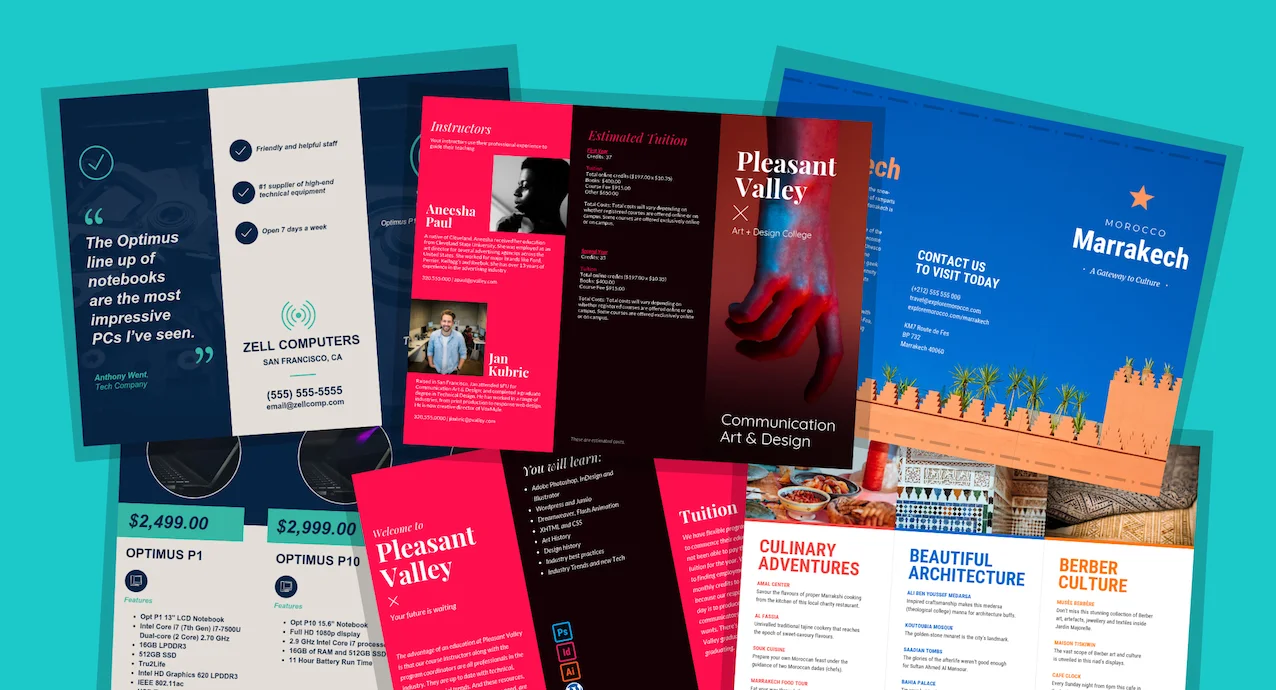
In the images above, you can see how print design uses high-quality photos, consistent color palettes, and structured layouts to look professional.
Print Design Checklist for Small Business Documents
A quick checklist to follow:
- Convert colors to CMYK
- Images at 300 DPI
- Font choices: legible, max 3 styles
- Clearly organized layout with white space
- Include bleed and trim marks
- Save file as PDF/X
As a designer use this checklist every time, as a business owner and with this knowledge, you can you’re your designer into how he/she could handle your project.
Step-by-Step: How to Get Started with Print Design By Yourself
- Decide your goal. Are you creating a leaflet for a new launch, or a business card to hand out?
- Choose a size & format. (E.g., tri‑fold brochure size or standard business card size)
- Pick colors and fonts that match your brand style.
- Gather images, logos at high resolution, maybe icons.
- Use a template or online tool. Like Canva, Affinity Publisher, Scribus (free!), or Microsoft Publisher all are good entry tools.
- Design with a grid. Keep your layout balanced, leave enough white space.
- Add bleeds and safe margins. Export as print-ready PDF.
- Check spelling and design details. Then send a proof to your printer.
- Print and share! Hand out flyers, mail postcards, and use business cards.

Common Mistakes to Avoid
- Using low‑resolution images (less than 300 DPI)
- Designing in RGB instead of CMYK
- Crowding text without enough space
- Over‑using fonts or colors
- Forgetting to add bleeds and margins
- Not checking a printed sample before mass printing
Why Print Design Still Matters
Even in today’s digital world, print design holds power:
- People can physically hold and interact with your materials.
- Print can feel more personal like a letter from a local business.
- A clean, well-printed design still stands out among digital noise.
- Businesses in Nigeria and worldwide still rely on brochures, flyers, and business cards to attract local customers.
Real‑World Examples
- Local Bakery Flyer: A bright flyer showing pastries, with big headline “Fresh Bakes Today!” and contact info.
- Salon Business Card: Brand colors, your name, logo, and social handle.
- Event Poster: Bold text, a central photo, clear date/time, and lots of breathing room so the message pops.
These kinds of print design pieces work in anywhere, giving small businesses a professional image and an easy way to share details.
Ready to boost your small business with great print design? Try creating a simple flyer, poster, or business card today:
- Pick an online tool like Canva or Scribus.
- Follow the print design checklist above.
- Once you’re happy, upload the PDF to a local print shop.
- See how people respond—and feel proud of your professional look!
Have questions on any part of print design? AC Digital would be happy to help you design your first item. Just ask!
Summary Table
| Concept | Easy Explanation |
| What is print design | Design made for physical materials, like flyers, posters, business cards |
| Color mode | Use CMYK for printing—colors show accurately |
| Images & fonts | Use 300 DPI images and readable fonts for clarity |
| Layout & grids | Arrange text and graphics neatly with space around elements |
| Technical setup | Include bleed, avoid margins getting cut, save as print‑ready formats |
| Why it matters | It creates a real, tactile marketing presence that builds trust |